Feature
AI caption generator for video: captions timed to every word you say
An AI caption generator listens to your video and shows each word on screen as you say it. Cutroom does this for your video and builds the captions into the picture.
In short
- An AI caption generator writes captions from the speech in your video and times each word to your voice.
- Cutroom captions videos of someone talking, up to 3 minutes long, in seven languages. It also adds clips, shortens pauses on the Punch and Native styles and exports a 9:16 MP4.
- Cutroom has 40 caption styles, 7 fonts and 16 colours, and captions cost nothing on top of the edit.
- A 30-second Cutroom video costs about 110 credits, plans start at $19.99 a month, and your first video is free.
- Submagic and VEED are better if you need translation, more languages, or captions on a video you already edited.

- Caption styles to pick from
- 40
- Extra credits for captions
- 0
- Caption fonts
- 7
What is an AI caption generator?
It turns the speech in your video into text and shows each word on screen as it is spoken.
- Captions let people follow your video with the sound off.
- Burned-in captions are part of the picture, so they show on every app.
- A separate subtitle file can be switched off, and some apps ignore it.
- Most caption tools let you fix a misheard word before you export.
How Cutroom makes captions
The captions come from the same transcript that Cutroom uses to edit your video.
- The captions use your exact words. Nothing is rewritten or summed up.
- Each word appears when you say it, timed from your own audio.
- You pick the language you spoke when you upload: English (US or UK), Spanish, Portuguese, German, French, Dutch or Italian.
- Fixing a misheard word in the transcript fixes the caption too.
From your audio to captions in the video
Captions are included in the 100 credits it costs to edit a video. Changing the style costs nothing.
Transcript
Every word timed from your audio
Pick a style
One of 40 caption styles
Select key words
Give them their own look
Export
Captions built into the 9:16 MP4
This is the whole editor
Highlight a phrase and a clip lands on those exact words. No timeline, no keyframes, no layers.
Caption style options
You pick a caption style, then its font, colour, size and position.
What you can change
| Setting | Options |
|---|---|
| Caption styles | 40 |
| Fonts | 7: Anton, Bebas Neue, Montserrat, Nunito, Instrument Serif, Oswald, Fredoka |
| Colours | 16 named colours |
| Position and size | Move up or down, set the size with a slider |
| Emoji | 14 styles add emoji, and one switch turns them off |
| Key words | Their own caption style, colour and font |
| Opening headline | 15 headline styles |
Setting: Caption styles
- Options
- 40
Setting: Fonts
- Options
- 7: Anton, Bebas Neue, Montserrat, Nunito, Instrument Serif, Oswald, Fredoka
Setting: Colours
- Options
- 16 named colours
Setting: Position and size
- Options
- Move up or down, set the size with a slider
Setting: Emoji
- Options
- 14 styles add emoji, and one switch turns them off
Setting: Key words
- Options
- Their own caption style, colour and font
Setting: Opening headline
- Options
- 15 headline styles
Which caption style to pick
Cutroom's 40 styles go from big and bold to small and quiet.
- A hard sales pitch suits a big, bold caption style.
- A calm founder video suits a quiet style, so it does not feel like shouting.
- A premium product suits a minimal style.
- Changing the style is free until you export.
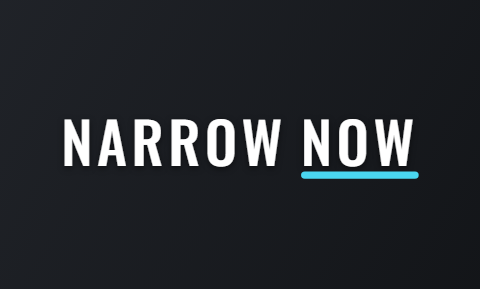
Four loud caption styles, then four quiet ones
The first four suit a hard sales pitch. The last four suit a calm founder video.
 Shout
Shout Brick
Brick Slam
Slam Stamp
Stamp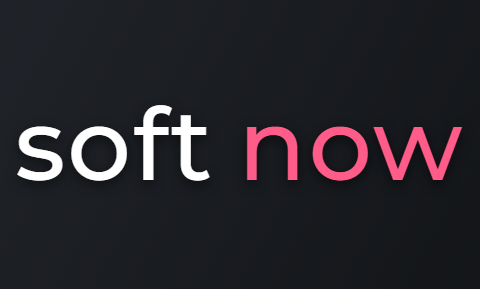 Soft
Soft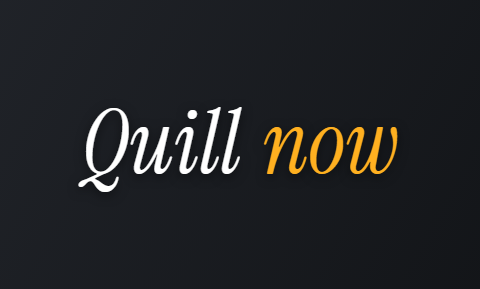 Quill
Quill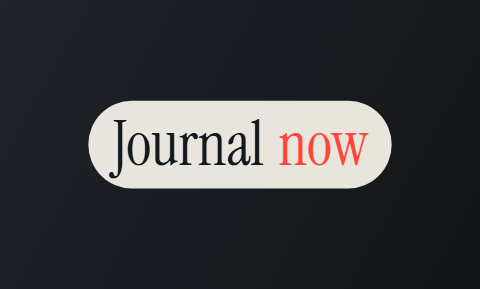 Journal
 Narrow
How to make key words stand out
You can select a few words and give just those their own caption style and colour.
- Good key words are a price, a time like '7 days', a free offer, or the thing only you do.
- Pick one or two key words per video, so your price or offer stands out from the rest.
- People who watch with the sound off still see your price and your offer.
What Cutroom's captions cannot do
Cutroom captions the video it edits for you. It is not a tool for captioning any file.
- Cutroom edits and captions the raw video you upload. It is not made for adding captions to a finished edit.
- Cutroom always adds short clips of what you talk about, and one switch turns them off. Only the Punch and Native styles shorten your pauses, and Straight cut and Flow keep your voice as you said it.
- Captions come out in the language you spoke. There is no translation.
- There is no separate subtitle file, like an SRT. The captions are part of the video.
- Captions are placed for vertical 9:16 video, clear of the username and buttons, and for no other shape.
What AI captions cost in Cutroom
Captions are part of the edit. Only the export is charged on top.
Credits and plans
| What | Cost |
|---|---|
| Edit: captions, cuts and clips | 100 credits |
| Changing the style, as often as you like | Free |
| Export | 20 credits per minute of video |
| A 30-second video, all in | About 110 credits |
| First video | Free, with no card, if you make it within 7 days of signing up. It carries a Cutroom watermark. |
| Lite | $19.99 a month for 1,250 credits, no watermark |
| Basic | $39.99 a month for 2,500 credits |
| Premium | $79.99 a month for 5,000 credits |
What: Edit: captions, cuts and clips
- Cost
- 100 credits
What: Changing the style, as often as you like
- Cost
- Free
What: Export
- Cost
- 20 credits per minute of video
What: A 30-second video, all in
- Cost
- About 110 credits
What: First video
- Cost
- Free, with no card, if you make it within 7 days of signing up. It carries a Cutroom watermark.
What: Lite
- Cost
- $19.99 a month for 1,250 credits, no watermark
What: Basic
- Cost
- $39.99 a month for 2,500 credits
What: Premium
- Cost
- $79.99 a month for 5,000 credits
Which AI caption generator should you choose?
Submagic, VEED, Captions and Zubtitle caption any video you give them. Cutroom only captions the video it edits for you.
- Choose Submagic if you caption many short clips and want them in other languages.
- Choose VEED if you need subtitles on any video, including footage someone else filmed.
- Choose the Captions app if you edit on your phone.
- Choose Zubtitle if you only want captions on a video that is already edited.
- Choose Cutroom if you want captions and clips added together on a short vertical ad, with the pauses shortened if you pick Punch or Native.
AI caption generators compared
Prices as each company publishes them, checked 21 September 2026.
| Tool | Best for | Price from |
|---|---|---|
| Cutroom | Ads made from one video of you talking | First video free; Lite $19.99/month |
| Submagic | Captioned shorts, in 123 languages | Starter $12/month yearly ($19 monthly) |
| VEED | Subtitles on any video in the browser | Free plan; Creator $10/user/month yearly |
| Captions (the app) | Editing talking videos on your phone | Free version; Max $24.99/month |
| Zubtitle | Captioning a video you already edited | Free plan, 2 videos a month; Guru $19/month |
Tool: Cutroom
- Best for
- Ads made from one video of you talking
- Price from
- First video free; Lite $19.99/month
Tool: Submagic
- Best for
- Captioned shorts, in 123 languages
- Price from
- Starter $12/month yearly ($19 monthly)
Tool: VEED
- Best for
- Subtitles on any video in the browser
- Price from
- Free plan; Creator $10/user/month yearly
Tool: Captions (the app)
- Best for
- Editing talking videos on your phone
- Price from
- Free version; Max $24.99/month
Tool: Zubtitle
- Best for
- Captioning a video you already edited
- Price from
- Free plan, 2 videos a month; Guru $19/month
Questions people ask
- What is the best AI caption generator for video?
- Submagic is strong for short clips in many languages, and VEED for subtitles on any video. Cutroom suits ads made from one video of you talking.
- Are the captions burned into the video?
- Yes. They are part of the exported 9:16 MP4, so they show on every app, even where a separate subtitle file is ignored.
- Which languages can Cutroom caption?
- Seven: English (US or UK), Spanish, Portuguese, German, French, Dutch and Italian. You pick yours when you upload, and the captions stay in that language.
- Can I download a subtitle file, like an SRT?
- No. Cutroom builds the captions into the MP4. VEED lets you download transcripts as SRT or VTT files on its paid plans.
- How do I fix a word it heard wrong?
- Double-click the word in the transcript and type the right one. The caption updates, and it costs nothing until you export.
- Do captions cost extra?
- No. They are included in the 100 credits it costs to edit a video. You only pay to export: 20 credits per minute of video.
- Can it translate captions or caption a finished video?
- No. Cutroom captions the video you upload, in the language you spoke. For translation or an already edited video, Submagic, VEED or Zubtitle fit better.
Upload one video of you talking and see your words captioned. Your first video is free.