Industry
Education video ads: a teacher or graduate talking for under a minute
Education video ads work best when a teacher or graduate talks to camera for under a minute. They film one clip and Cutroom sends back a captioned 9:16 ad.
In short
- Education video ads work best when a real teacher or graduate makes one specific point, in under a minute.
- The three formats that work are what week one looks like, a graduate's story, and an open day or deadline invite.
- One programme needs three ads per intake, timed to when applications open and close.
- Cutroom turns one clip of up to 3 minutes into a captioned 9:16 ad.
- Your first video is free, with no card. A 30-second ad costs about 110 credits.

- Longest clip a teacher films
- 3 min
- Credits for a 30-second ad, edit and export
- about 110
- Basic a month, 2,500 credits
- $39.99
What education video ads need
An education ad needs a real teacher or graduate saying one specific thing, in under a minute.
- The speaker has to be someone who was there, which means a teacher, a graduate or a current student.
- One ad covers one thing, such as week one, a graduate's story or the next deadline.
- The captions are burned into the picture, because applicants scroll with the sound off.
Who speaks in an education ad, by type of school
| Type of school | Who speaks | What they say |
|---|---|---|
| Private school | A teacher, to parents | What a day in class looks like |
| Coding bootcamp | A graduate | What changed, and the next cohort's start date |
| Language academy | A teacher | What the first lesson covers and how fast students speak |
Type of school: Private school
- Who speaks
- A teacher, to parents
- What they say
- What a day in class looks like
Type of school: Coding bootcamp
- Who speaks
- A graduate
- What they say
- What changed, and the next cohort's start date
Type of school: Language academy
- Who speaks
- A teacher
- What they say
- What the first lesson covers and how fast students speak
How many ads one intake needs
Enrolment runs on intake dates, so plan the ads around them.
- One programme needs three ads, about 330 credits, which fits inside Lite.
- Four programmes need twelve ads, about 1,320 credits, which fits inside Basic.
- Each ad comes from one clip filmed by one person.
Three ads per programme, per intake
| When | Ad to run |
|---|---|
| Applications open | What week one looks like |
| Middle of the intake | A graduate's story |
| Final two weeks | Open day or deadline invite |
When: Applications open
- Ad to run
- What week one looks like
When: Middle of the intake
- Ad to run
- A graduate's story
When: Final two weeks
- Ad to run
- Open day or deadline invite
This is the whole editor
Highlight a phrase and a clip lands on those exact words. No timeline, no keyframes, no layers.
Format 1: what week one looks like
The biggest unknown for an applicant is the first week.
- The four parts are day one, the first piece of work, how students get help, and the next intake.
- Name the project students build in week one, or read out the real timetable.
- The teacher who runs the day is the right person to film it.
A week-one explainer, in four steps
One clip from the teacher. Cutroom trims the dead air and places the b-roll on the words.
Day one
Where they sit, who they meet
First piece of work
A named project or lesson
Getting help
Who answers their questions
Next intake
The start date and one step
Format 2: a graduate tells their story
A graduate's own story is the proof an applicant looks for.
- Ask for one moment, such as the first project that worked or the job offer.
- Let graduates tell it their own way, in their own words.
- Keep placement rates and salaries out unless your institution can document them.
- Read the transcript before export and delete any line that claims too much.
One frame of a finished graduate story
The graduate stays on screen, a clip sits on a card beside them, and the captions are inside the picture.



Format 3: the open day or deadline invite
An invite gives an interested applicant a date to act on.
- Say the event or the deadline, what happens there, and whether to register, book a visit or apply.
- The date goes in the headline card, so it reads in the first second.
- Film a new clip for each event, because the spoken date has to match, at about 110 credits each.
Headline card styles for an event
Four of the 15 hook themes. Write the headline yourself or pick one Cutroom drafted.
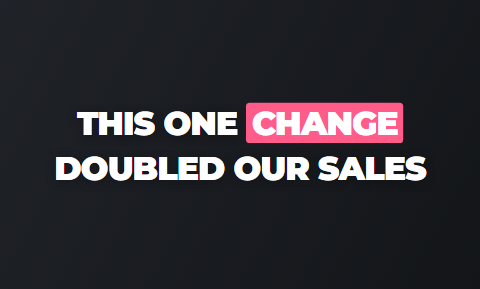 Punch
Punch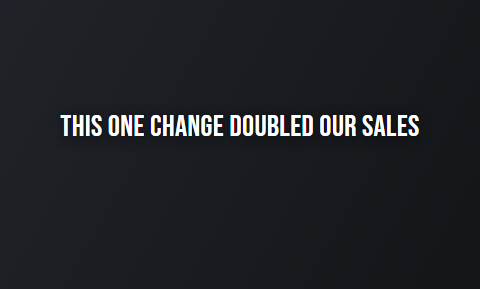 Spread
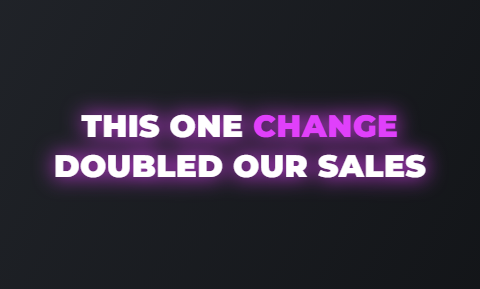 Glow
Glow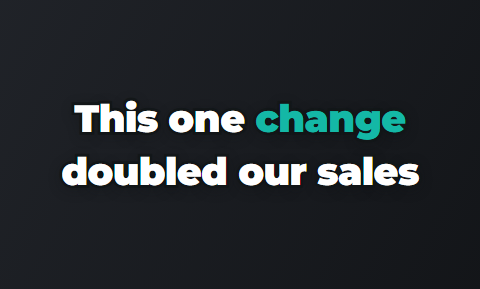 Outline
How one clip becomes a finished ad
The teacher films and the marketer finishes. The teacher needs no Cutroom account.
- The teacher films one vertical clip on a phone, up to 3 minutes, and sends it to the marketer.
- Cutroom cuts it, puts b-roll on the words and burns in the captions, in about a minute.
- The marketer fixes a mis-heard course name and deletes any line that promises too much.
- Use the same caption theme for every programme, then export a 9:16 MP4.
The finished frame in the editor's player
This is the file that exports: 9:16, captions in the picture, the headline card at the top.

▸ 0:07 / 0:26 · shot 1 of 5
Other tools for education video ads
VEED and Submagic both have pages for education, and both are good at what they set out to do.
- VEED is best if you want to build each ad yourself on a timeline, with templates.
- Submagic is best if your source is a long recorded lesson.
- Cutroom is best if teachers and graduates send short clips and you need finished 9:16 ads back.
Three tools for education video ads, side by side
Prices as published on each vendor's own pricing page on the date shown. Plans change; check the page before you buy.
| Tool | Best for | Editing approach | Platform | Pricing from |
|---|---|---|---|---|
| Cutroom | One teacher or graduate clip finished as a 9:16 ad | Upload a clip; captions, hook and b-roll are placed on the words | Browser | First video free, no card; Lite $19.99/month |
| Browser editing with auto subtitles | Browser timeline with templates, auto subtitles and AI generation | Browser, mobile app | Free plan; Creator $10/user/month, annual | |
 Submagic Submagic | Captioned shorts at volume | Captions, b-roll and zooms added automatically to shorts | Web | Free to try, no card; Starter $12/month, annual ($19 monthly) |
Cutroom
- Best for
- One teacher or graduate clip finished as a 9:16 ad
- Approach
- Upload a clip; captions, hook and b-roll are placed on the words
- Platform
- Browser
- Pricing from
- First video free, no card; Lite $19.99/month
VEED
- Best for
- Browser editing with auto subtitles
- Approach
- Browser timeline with templates, auto subtitles and AI generation
- Platform
- Browser, mobile app
- Pricing from
- Free plan; Creator $10/user/month, annual
- Submagic
- Best for
- Captioned shorts at volume
- Approach
- Captions, b-roll and zooms added automatically to shorts
- Platform
- Web
- Pricing from
- Free to try, no card; Starter $12/month, annual ($19 monthly)
Prices and plans read from each vendor's own pricing page on 21 September 2026.
What education video ads cost
Cutroom charges 100 credits to edit a video and 20 credits for each minute you export.
- A 30-second ad costs about 110 credits.
- Twelve ads for one intake cost about 1,320 credits, just over Lite's 1,250.
- Four programmes across three intakes a year is 36 ads, about 3,960 credits over the year.
- In a month where you make a whole intake's twelve ads, Basic's 2,500 credits cover it, and quieter months fit inside Lite.
- Your first video is free, so you can show the team one finished ad before you pay.
- The Cutroom mark is on the free video only, and Lite and the plans above remove it.
Cutroom plans for schools and academies
| Plan | Price | Credits | 30-second ads |
|---|---|---|---|
| First video | Free, no card | 600 | 1, made within 7 days, with a Cutroom mark across the middle |
| Lite | $19.99 a month | 1,250 | About 11 a month, which covers three programmes at three ads each |
| Basic | $39.99 a month | 2,500 | About 22 a month, which covers twelve ads for four programmes |
| Premium | $79.99 a month | 5,000 | About 45 a month |
Plan: First video
- Price
- Free, no card
- Credits
- 600
- 30-second ads
- 1, made within 7 days, with a Cutroom mark across the middle
Plan: Lite
- Price
- $19.99 a month
- Credits
- 1,250
- 30-second ads
- About 11 a month, which covers three programmes at three ads each
Plan: Basic
- Price
- $39.99 a month
- Credits
- 2,500
- 30-second ads
- About 22 a month, which covers twelve ads for four programmes
Plan: Premium
- Price
- $79.99 a month
- Credits
- 5,000
- 30-second ads
- About 45 a month
Questions people ask
- What makes a good education video ad?
- A real teacher or graduate talking for under a minute about one specific thing, such as week one, what changed after the course, or the next intake date. Name the project students build in week one, or read out the real timetable.
- Who should be on camera, a teacher or a graduate?
- Both, in different ads. A teacher explains what the course involves and what week one looks like. A graduate explains what changed afterwards. Film each as one clip of up to 3 minutes.
- Can a bootcamp mention job outcomes in a video ad?
- Carefully. Let graduates describe their own experience, and keep placement rates or salary figures out unless your institution can document them. Cutroom shows every word as text before export, so a sentence that claims too much is easy to delete.
- How many ads does one intake need?
- Three per programme: a week-one explainer, a graduate story and a deadline invite. Four programmes is twelve ads, about 1,320 credits, which fits inside Basic at $39.99 a month. One programme fits inside Lite at $19.99.
- Does Cutroom make landscape ads for YouTube or display?
- No. Cutroom exports 9:16 MP4 files only, from one clip of up to 3 minutes, for Reels, TikTok, Shorts and Stories. A landscape brand film or a display banner needs another tool.
- Is the free video enough to test education ads?
- Yes. Your first video is free, with 600 credits, 7 days to make it and no card. It is a full edit with a Cutroom mark across the middle. Ask one teacher for a week-one explainer; Lite at $19.99 a month removes the mark.
- Who should not use Cutroom for education video ads?
- Institutions that want to build every ad frame by frame will prefer VEED. Teams whose material is long recorded lessons should look at Submagic.
Ask one teacher to describe week one, on camera, in one clip. Your first video is free.