For your team
Student recruitment videos: one real student, one reason to apply
A student recruitment video works best when a real student or lecturer gives one reason to apply, in under a minute. They film one clip on a phone and Cutroom sends back a captioned 9:16 ad.
In short
- A student recruitment video works best when a real student gives one specific reason to apply, in under a minute.
- The three formats that work are why I chose this course, a lecturer explainer and a deadline reminder.
- The student films on their own phone and the admissions team finishes the ad.
- Cutroom turns one clip of up to 3 minutes into a captioned 9:16 ad.
- Your first video is free, with no card. A 30-second ad costs about 110 credits.

- Longest clip a student sends
- 3 min
- Credits for a 30-second ad, edit and export
- about 110
- Premium a month, 5,000 credits
- $79.99
What makes a student recruitment video work
Applicants watch these on TikTok and Instagram, where a plain phone video from a student beats a polished film.
- A real student or lecturer works better than a hired presenter.
- One video covers one programme and one reason to apply.
- The first sentence has to give the reason to apply, before the name of the university.
- The captions are burned into the picture, for applicants scrolling with the sound off.
- A fresh version goes out before each application deadline and each open day.
Give every programme its own ad
One clip from one student is enough for one ad, so every programme can have its own.
- Ask each programme leader for one student who took the course and will film.
- One afternoon of filming gives you one ad per programme.
- The same caption theme on all of them keeps the set looking like one campaign.
This is the whole editor
Highlight a phrase and a clip lands on those exact words. No timeline, no keyframes, no layers.
Format 1: why I chose this course
Ask a current student to name the moment they decided to apply, and start the clip there.
- These three questions get a usable answer: why did you choose this course, what surprised you in the first week, and what would you tell someone deciding now.
- Ask for something specific, such as a module, a lab, a placement or a lecturer they now know by first name.
- A student's own story does the job of a testimonial, and it speaks to the applicant who could be sitting next to them in week one.
What a finished student video looks like on a phone
Captions in the picture, a headline card at the top and b-roll on the words it illustrates.

▸ 0:07 / 0:26 · shot 1 of 5
Format 2: a lecturer explains the programme
Lecturers explain their programme at every open day. Filmed once, it reaches applicants who could not travel.
- About a minute is enough, in four parts.
- The four parts are who it is for, week one, after graduating, and how to apply.
- A lecturer who talks the way they teach works better than one reading a script.
A one-minute programme explainer, in four parts
One clip from the lecturer. Cutroom cuts the dead air and places the b-roll.
Who it is for
The applicant in one sentence
Week one
What they will do first
After graduating
Where people go next
How to apply
One step and the date
Format 3: the application deadline reminder
A deadline gives an undecided applicant a reason to act this week.
- You say the programme, the date and the one step to apply.
- The date goes in the headline card, so it reads in the first second.
- Film a new clip for each deadline, about twenty seconds, because the spoken date has to match.
- Each one costs about 110 credits, which is cheap enough to make for every intake.
Headline card styles for a deadline
Four of the 15 hook themes. The date goes in the headline, where it reads before anyone hears it.
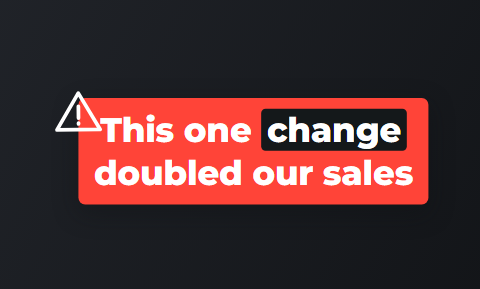 Alert
Alert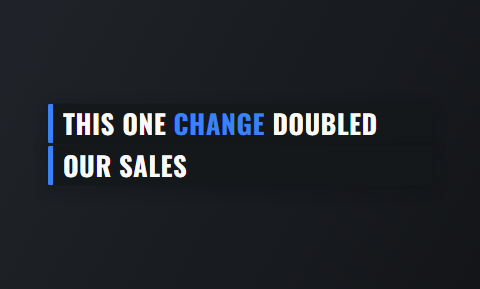 Ticker
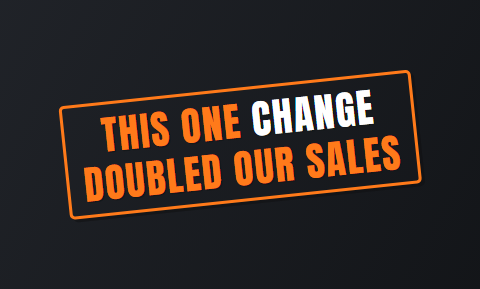 Stamp
Stamp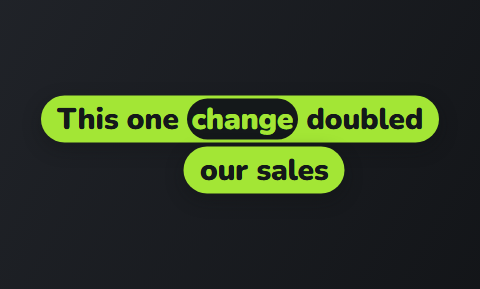 Ribbon
How one clip becomes a finished ad
The student films and admissions finishes. Nobody in that chain needs editing skills.
- The student films one vertical clip on their own phone, up to 3 minutes, and needs no Cutroom account.
- Cutroom transcribes it, cuts it, puts b-roll on the words and burns in the captions, in about a minute.
- Admissions fixes a mis-heard course name and deletes any line that promises too much.
- You pick the caption theme, write the opening headline and export a 9:16 MP4.
- Get a signed release from every student, because Cutroom does not manage consent.
The review screen: every word of the ad as text
Admissions reads the transcript, not a timeline. Delete a line and the video rebuilds.
B-rolls · 5
1 2
2 3
3 4
4 5
5Most face serums make one big promise, then quietly do nothing. This one has three ingredients, works in ten days, and costs less than your coffee habit. If your skin doesn’t change, you get every cent back.
highlight = b-roll · struck out = already cut
▸ 0:07 / 0:26 · shot 1 of 5
- 1B-roll on the exact wordsReal footage, placed where showing beats telling.
- 2The opening headlineWritten from what you said. Pick one it drafted, or write your own.
- 3Captions in 40 themesPick a theme, then its font and colour.
- 49:16, ready to exportExport renders one vertical MP4.
Other video tools universities use
OpusClip, Captions and Submagic all have pages for education, and each is strong at something different.
- OpusClip and Submagic are best if your source is a long lecture or event recording.
- Captions is best if staff film and edit on their own phones.
- Cutroom is best if students send short clips and admissions needs finished 9:16 ads back.
Four tools for student recruitment videos, side by side
Prices as published on each vendor's own pricing page on the date shown. Plans change; check the page before you buy.
| Tool | Best for | Editing approach | Platform | Pricing from |
|---|---|---|---|---|
| Cutroom | One student or lecturer clip finished as a 9:16 ad | Upload a clip; captions, hook and b-roll are placed on the words | Browser | First video free, no card; Lite $19.99/month |
 OpusClip OpusClip | Turning long videos into many short clips | Clips long video; Agent Opus writes a video from a script | Web, mobile | Free plan (watermark); Starter $15/month |
 Captions Captions | Editing a video of you talking on a phone | AI edit styles applied to your video, with manual controls | iOS, Android, web | Free version; Max $24.99/month |
 Submagic Submagic | Captioned shorts at volume | Captions, b-roll and zooms added automatically to shorts | Web | Free to try, no card; Starter $12/month, annual ($19 monthly) |
Cutroom
- Best for
- One student or lecturer clip finished as a 9:16 ad
- Approach
- Upload a clip; captions, hook and b-roll are placed on the words
- Platform
- Browser
- Pricing from
- First video free, no card; Lite $19.99/month
- OpusClip
- Best for
- Turning long videos into many short clips
- Approach
- Clips long video; Agent Opus writes a video from a script
- Platform
- Web, mobile
- Pricing from
- Free plan (watermark); Starter $15/month
- Captions
- Best for
- Editing a video of you talking on a phone
- Approach
- AI edit styles applied to your video, with manual controls
- Platform
- iOS, Android, web
- Pricing from
- Free version; Max $24.99/month
- Submagic
- Best for
- Captioned shorts at volume
- Approach
- Captions, b-roll and zooms added automatically to shorts
- Platform
- Web
- Pricing from
- Free to try, no card; Starter $12/month, annual ($19 monthly)
Prices and plans read from each vendor's own pricing page on 21 September 2026.
What student recruitment videos cost
Cutroom charges 100 credits to edit a video and 20 credits for each minute you export.
- A 30-second ad costs about 110 credits.
- Premium's 5,000 credits cover about 45 ads a month, which suits a university with many programmes.
- Your first video is free and carries a Cutroom mark that Lite and the plans above remove.
Cutroom plans for admissions teams
| Plan | Price | Credits | 30-second ads |
|---|---|---|---|
| First video | Free, no card | 600 | 1, made within 7 days, with a Cutroom mark across the middle |
| Lite | $19.99 a month | 1,250 | About 11 a month, no Cutroom mark |
| Basic | $39.99 a month | 2,500 | About 22 a month, plus avatars and generated music |
| Premium | $79.99 a month | 5,000 | About 45 a month, for many programmes |
Plan: First video
- Price
- Free, no card
- Credits
- 600
- 30-second ads
- 1, made within 7 days, with a Cutroom mark across the middle
Plan: Lite
- Price
- $19.99 a month
- Credits
- 1,250
- 30-second ads
- About 11 a month, no Cutroom mark
Plan: Basic
- Price
- $39.99 a month
- Credits
- 2,500
- 30-second ads
- About 22 a month, plus avatars and generated music
Plan: Premium
- Price
- $79.99 a month
- Credits
- 5,000
- 30-second ads
- About 45 a month, for many programmes
Questions people ask
- Do students need a Cutroom account to film?
- No. A student films one vertical clip on their own phone, up to 3 minutes, and sends you the file. The marketer uploads it, reads the transcript and exports. Nobody on the student side installs anything or signs up.
- What should a student recruitment video say?
- One reason to apply, told by someone who took the course. Name something specific: a module, a lab, a placement or a lecturer. Keep it under a minute, open with the moment they decided, and end with the step to apply.
- Can a lecturer record instead of a student?
- Yes. A lecturer explaining who the programme is for, what week one looks like and where graduates go works well. Cutroom edits their clip the same way, and the edit comes back in about a minute.
- Does Cutroom make a 16:9 campus film as well?
- No. Cutroom exports 9:16 MP4 files only, for TikTok, Reels and Shorts, from one clip of up to 3 minutes. A landscape campus film with several speakers belongs with your video team or an agency.
- How do we handle consent from students on camera?
- Get a signed release from every student before an ad runs, using your institution's own form. Cutroom does not collect or store consent. You can read every word of the ad before export and remove any line first.
- Is the free video enough to try it?
- Yes. Your first video is free, with 600 credits, 7 days to make it and no card. It is a full edit with a Cutroom mark across the middle. Show admissions the result; Lite at $19.99 a month removes the mark.
- Who should not use Cutroom for student recruitment?
- Universities that want a landscape campus film, a multi-speaker documentary or ads cut from long lecture recordings. A video team, OpusClip or Submagic fit those better.
Ask one student why they chose the course and film the answer. Your first video is free.