Guide
Best AI video editor for Instagram Reels: CapCut for montages, Captions for talking Reels
CapCut is the best editor for montage and trend Reels: it is free to start, though its auto captions need Pro. Captions is the best for Reels of you talking, filmed on your phone.
In short
- The best AI video editor for Instagram Reels is CapCut for montages and Captions for Reels of you talking.
- Canva is best if your Reels must match posts you already design in Canva.
- VEED and Kapwing add subtitles for you in the browser. VEED costs $10 a month per person, Kapwing $16, billed yearly.
- All six are free to start. VEED and Kapwing put a watermark on free exports, and Captions' AI edit costs $24.99 a month.
- Instagram's own Edits app is free on iPhone and Android and exports without an added watermark.

- CapCut, free to start
- $0
- Canva Pro a year for one person
- US$144
- VEED Creator a month per person, billed yearly
- $10
The best AI video editors for Instagram Reels at a glance
An AI video editor for Reels helps with captions, cuts and the vertical 9:16 export. Here are six, with what each does and costs.
Six AI video editors for Instagram Reels, side by side
Prices as published on each company's own pricing page on the day shown. Plans change, so check before you pay.
| Tool | Best for | Editing approach | Platform | Pricing from |
|---|---|---|---|---|
 CapCut CapCut | Montage and trend Reels, edited on your phone | A timeline with templates and AI tools; you make every cut | iOS, Android, Windows, Mac, web | Free; Pro $19.99/month or $179.99/year (varies by region) |
 Canva Canva | Reels that match the posts you design | You drag photos, clips and text onto a page, and they play in order on a simple timeline | Browser, iOS, Android, Windows, Mac | Free plan; Pro US$144/year for one person (about $12/month) |
| Captioning Reels in the browser | A browser timeline with auto subtitles and AI tools | Browser, mobile app | Free plan; Creator $10/month per person, billed yearly | |
 Captions Captions | Reels of you talking, filmed and edited on your phone | You pick an AI edit style, and it cuts scenes and adds b-roll for you | iOS, Android, web | Free version; Max $24.99/month |
 Kapwing Kapwing | Editing Reels as a team in the browser | A drag-and-drop browser timeline with AI tools | Browser, with mobile support | Free plan (watermark); Pro $16/month per person, billed yearly ($24 monthly) |
| Cutroom | A clip of you talking, finished as a Reel | Edits your clip for you: b-roll, captions and an opening headline | Browser | First video free, no card; Lite $19.99/month |
- CapCut
- Best for
- Montage and trend Reels, edited on your phone
- Approach
- A timeline with templates and AI tools; you make every cut
- Platform
- iOS, Android, Windows, Mac, web
- Pricing from
- Free; Pro $19.99/month or $179.99/year (varies by region)
- Canva
- Best for
- Reels that match the posts you design
- Approach
- You drag photos, clips and text onto a page, and they play in order on a simple timeline
- Platform
- Browser, iOS, Android, Windows, Mac
- Pricing from
- Free plan; Pro US$144/year for one person (about $12/month)
VEED
- Best for
- Captioning Reels in the browser
- Approach
- A browser timeline with auto subtitles and AI tools
- Platform
- Browser, mobile app
- Pricing from
- Free plan; Creator $10/month per person, billed yearly
- Captions
- Best for
- Reels of you talking, filmed and edited on your phone
- Approach
- You pick an AI edit style, and it cuts scenes and adds b-roll for you
- Platform
- iOS, Android, web
- Pricing from
- Free version; Max $24.99/month
- Kapwing
- Best for
- Editing Reels as a team in the browser
- Approach
- A drag-and-drop browser timeline with AI tools
- Platform
- Browser, with mobile support
- Pricing from
- Free plan (watermark); Pro $16/month per person, billed yearly ($24 monthly)
Cutroom
- Best for
- A clip of you talking, finished as a Reel
- Approach
- Edits your clip for you: b-roll, captions and an opening headline
- Platform
- Browser
- Pricing from
- First video free, no card; Lite $19.99/month
Prices and plans read from each vendor's own pricing page on 21 September 2026.
What is the difference between these Reels editors?
The main difference is how much of the edit the tool does for you, and whether it keeps your brand look.
- CapCut is a free timeline editor. It has AI helpers, but you make every cut.
- Canva is a design tool with a video timeline, so a Reel can use the same colours and fonts as your posts.
- VEED and Kapwing are browser editors built around auto subtitles, and they suit small teams.
- Captions applies an AI edit to a video of you talking, on your phone.
- Cutroom edits a clip of you talking into a finished Reel for you.
Reels editors side by side
From each company's own site.
| Tool | What it does for you | Keeps your brand look |
|---|---|---|
| CapCut | Gives you templates and effects; you make every cut | CapCut does not advertise a brand kit |
| Canva | A design canvas with a video timeline | Saved colours, fonts and logo |
| VEED | A browser timeline with auto subtitles | Saved colours, fonts and logo |
| Kapwing | A team timeline that can also clip long videos | Brand kit and custom fonts on Pro |
| Captions | Cuts scenes, adds b-roll and styles captions, on Max | Captions does not advertise a brand kit |
| Cutroom | Edits a clip of you talking into a finished Reel | No; you pick a caption style for each video |
Tool: CapCut
- What it does for you
- Gives you templates and effects; you make every cut
- Keeps your brand look
- CapCut does not advertise a brand kit
Tool: Canva
- What it does for you
- A design canvas with a video timeline
- Keeps your brand look
- Saved colours, fonts and logo
Tool: VEED
- What it does for you
- A browser timeline with auto subtitles
- Keeps your brand look
- Saved colours, fonts and logo
Tool: Kapwing
- What it does for you
- A team timeline that can also clip long videos
- Keeps your brand look
- Brand kit and custom fonts on Pro
Tool: Captions
- What it does for you
- Cuts scenes, adds b-roll and styles captions, on Max
- Keeps your brand look
- Captions does not advertise a brand kit
Tool: Cutroom
- What it does for you
- Edits a clip of you talking into a finished Reel
- Keeps your brand look
- No; you pick a caption style for each video
This is the whole editor
Highlight a phrase and a clip lands on those exact words. No timeline, no keyframes, no layers.
CapCut
CapCut is a free video editor with a full timeline that runs on the phone you filmed with. It is best for montage and trend Reels.
- You edit on a timeline with templates, effects and AI tools, and you make every cut yourself.
- The free version lets you cut, trim and add text and effects yourself, and exports up to 8K.
- Auto captions, background removal and noise reduction are Pro features, according to CapCut's own site.
- Pro costs $19.99 a month or $179.99 a year. The price is set in the app and varies by region.
Canva
Canva is a design tool first, with a video editor that lets a Reel match the rest of your feed. It is best if you already design your posts in Canva.
- You drag photos, clips and text onto a page, and they play in order on a simple timeline.
- Canva's AI can turn your clips into a first draft, and it makes and styles captions in one click.
- The brand kit keeps your colours, fonts and logo ready in every design, and one video can be resized for every channel.
- There is a free plan. Pro is US$144 a year for one person, about $12 a month.
- For a Reel of you talking, you still decide yourself where to cut and remove every pause.
VEED
VEED is a browser video editor built around auto subtitles. It adds subtitles to a Reel in your browser, so it works on any laptop.
- Every paid plan includes unlimited auto subtitles.
- It also has AI avatars, AI voices, text-to-video and screen recording.
- The Pro plan translates into more than 50 languages.
- There is a free plan. Creator costs $10 a month per person, billed yearly, and removes the watermark.
- You still put the edit together by hand.
Captions
Captions is a phone app that records and edits talking videos. It is best for Reels of you talking that you film and post from your phone.
- You pick an AI Edit style, and it cuts scenes, adds b-roll and styles the captions. Then you adjust it by hand.
- The AI decides where the b-roll goes. You can then change details yourself, or ask its chat editor for changes in plain words.
- Captions come in more than 100 languages, and it can correct eye contact and remove noise.
- The free version only trims and adds transitions. The AI edit needs Max, at $24.99 a month.
Kapwing
Kapwing is a browser editor built for teams, so two people can work on the same Reel. It can also cut a long recording into Reels.
- You edit on a drag-and-drop timeline with AI tools for subtitles, translation and clipping.
- Pro includes up to 1,000 minutes of auto subtitles a month, custom fonts and 100 GB of storage.
- The free plan exports 720p with a Kapwing watermark, up to 4 minutes long.
- Pro costs $16 a month per person billed yearly, or $24 month to month.
- You still place every clip on the timeline yourself.
Is Instagram's own Edits app enough?
For Reels you edit yourself, often yes. Edits is Instagram's own video editing app, and it is free.
- You download it free from the App Store or Google Play and sign in with your Instagram account.
- It exports without an added watermark and shares straight to Instagram and Facebook.
- You edit clip by clip on a timeline, with green screen, transitions, templates and a library of text styles.
- Its camera records up to 10 minutes at a time.
- Choose one of the AI editors above if you want b-roll added for you or the whole edit done for you.
How much do AI video editors for Reels cost?
All six are free to start, and so is Instagram's own Edits app. VEED and Kapwing put a watermark on free exports, and Captions' AI edit costs $24.99 a month.
Free options and paid plans
Prices from each company's own page.
| Tool | Free option | Paid from |
|---|---|---|
| CapCut | Free, with auto captions on Pro | Pro $19.99 a month in the app, varies by region |
| Canva | Free plan | Pro US$144 a year for one person |
| VEED | Free plan with a watermark | Creator $10 a month per person, billed yearly |
| Captions | Free version: trimming and transitions | Max $24.99 a month, for the AI edit |
| Kapwing | Free plan: 720p, watermark, 4-minute exports | Pro $16 a month per person, billed yearly ($24 monthly) |
| Cutroom | First video free, no card | Lite $19.99 a month |
| Instagram's Edits app | Free, with no added watermark | Free |
Tool: CapCut
- Free option
- Free, with auto captions on Pro
- Paid from
- Pro $19.99 a month in the app, varies by region
Tool: Canva
- Free option
- Free plan
- Paid from
- Pro US$144 a year for one person
Tool: VEED
- Free option
- Free plan with a watermark
- Paid from
- Creator $10 a month per person, billed yearly
Tool: Captions
- Free option
- Free version: trimming and transitions
- Paid from
- Max $24.99 a month, for the AI edit
Tool: Kapwing
- Free option
- Free plan: 720p, watermark, 4-minute exports
- Paid from
- Pro $16 a month per person, billed yearly ($24 monthly)
Tool: Cutroom
- Free option
- First video free, no card
- Paid from
- Lite $19.99 a month
Tool: Instagram's Edits app
- Free option
- Free, with no added watermark
- Paid from
- Free
Which AI video editor should you choose for Instagram Reels?
Choose by what your Reels are made of.
Which AI video editor should you choose for Instagram Reels
Choose CapCut if you make montage or trend Reels on your phone and want a free timeline with templates.
Choose Canva if you design your posts in Canva and want your Reels in the same colours, fonts and logo.
Choose VEED if you want one browser tool for subtitles, screen recordings and the occasional AI avatar or voice.
Choose Captions if you film Reels of you talking on your phone and want an AI edit and animated captions in the app.
Choose Kapwing if two people edit the same Reel, or you cut long recordings into Reels in the browser.
Choose Instagram's Edits app if you edit Reels yourself on your phone and want a free app from Instagram with no added watermark.
Choose Cutroom if you want a clip of you talking back as a finished Reel with b-roll, captions and an opening headline. Your first video is free.
Where Cutroom fits
Cutroom edits one kind of Reel: you talking to camera. You upload the clip and get a finished Reel back.
- You upload one clip of yourself talking, up to 3 minutes long.
- Cutroom cuts the pauses, puts b-roll on your words, and adds captions in 40 styles and an opening headline.
- You can move the captions up or down, so Instagram's buttons do not cover them, and set their size.
- It does not add your logo, so if every Reel must match the posts you design, Canva is the better place to start.
- It does not make montages, or Reels made of text slides.
- Your first video is free, with no card, and you have 7 days to make it. It carries a Cutroom mark; Lite at $19.99 a month removes it.
Some of Cutroom's 40 caption styles
 Shout
Shout Clean
Clean Hollow
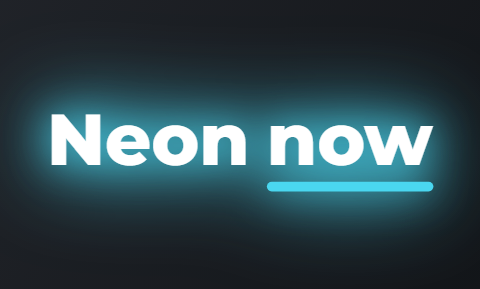 Neon
Neon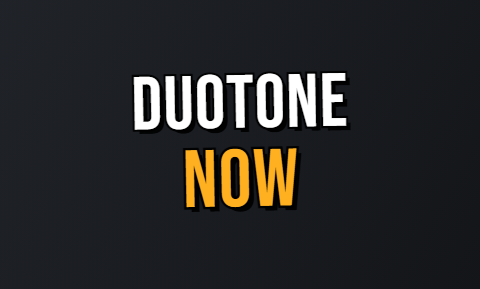 Duotone
 Press
Press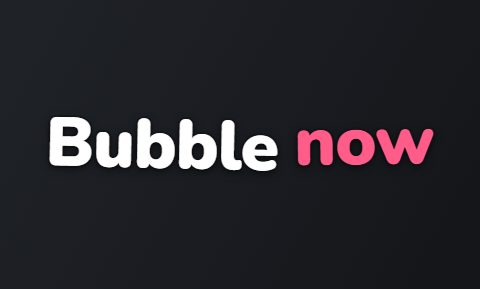 Bubble
 Pour
Pour
Questions people ask
- What is the best AI video editor for Instagram Reels?
- CapCut for montage and trend Reels, and Captions for Reels of you talking filmed on a phone. Canva is best if your Reels must match the posts you design, and VEED or Kapwing if you edit in a browser as a small team.
- Which AI video editors for Reels are free?
- All six are free to start. CapCut is a free app, and Canva, VEED and Kapwing have free plans; VEED and Kapwing add a watermark. Captions' free version only trims, and its AI edit is paid. Instagram's own Edits app is free too, and Cutroom's first video is free.
- Can an AI video editor keep my Reels on brand?
- Yes, Canva and VEED can: both save your colours, fonts and logo. Kapwing has a brand kit on Pro. CapCut and Captions do not advertise a brand kit. Cutroom does not add your logo; you pick one of 40 caption styles for each video.
- Which editor adds captions to Reels automatically?
- All six do. VEED and Kapwing make subtitles in the browser, Canva makes and styles them in one click, and Captions animates them. CapCut's auto captions need Pro. Cutroom adds them in the style you pick, and you can fix a misheard word.
- Canva or CapCut for Reels?
- Canva if your Reels must match the posts you design in Canva. CapCut for montages and trends edited on your phone. Canva's timeline sits inside a design tool with your saved colours and fonts. CapCut's timeline goes deeper, with more effects. Both are free to start.
- Which AI video editor for Reels works best on a phone?
- CapCut and Captions. CapCut is a free phone editor for montage and trend Reels, and Captions applies an AI edit to a video of you talking. Instagram's own Edits app is free on iPhone and Android, and Canva and VEED have phone apps too.
- Is Instagram's Edits app free?
- Yes. Edits is free to download from the App Store and Google Play, and it exports without an added watermark. You sign in with your Instagram account and can share straight to Instagram and Facebook.
Upload one clip of yourself talking and see the finished Reel before you pay. Your first video is free.