For your team
Solar video ads homeowners trust: a real installer on camera
The solar video ads homeowners trust show a real installer explaining a power bill, with no promised savings figure. Film one clip on a phone and Cutroom returns a captioned 9:16 ad in about a minute.
In short
- The solar video ad that works is your installer or owner on camera, explaining a power bill in plain words.
- The three formats that work are the bill explainer, one objection per video, and a local install story.
- Leave the federal home solar tax credit out. The IRS says it ended after 2025.
- Cutroom turns one phone clip into a captioned 9:16 ad in about a minute.
- Your first video is free with no card, and Lite is $19.99 a month for about 10 one-minute videos.
- Longest clip you can upload
- 3 min
- A good length for one objection answer
- 45 s
- About how long the edit takes
- 1 min
What a solar video ad needs
Homeowners are wary of solar ads. A real installer explaining a real bill is what earns their trust.
- A stock-footage ad with a voiceover looks like every other solar ad in the feed.
- Leads on Meta and TikTok come from testing many ads and replacing the ones that stop working.
- Incentives, utility rates and financing change by state and by quarter, so the ad has to be right today.
- When a fact changes, you re-record that one sentence rather than redesign the whole ad.
Tax credit and savings claims: what to leave out
A claim that was true last spring can be wrong by autumn. A homeowner who checks it stops trusting the rest.
- Leave the federal home solar tax credit out of ads for new installs.
- Leave out a savings figure unless you can stand behind it for that viewer's roof and utility.
- Point to your state energy office page instead of saying an incentive percentage on camera.
- Say what your installer actually checks, which is the last twelve months of bills, the roof and the shade.
- An ad written this way still runs after the next policy change.
What to say instead
| Claim | Put it in the ad? | Say this instead |
|---|---|---|
| Federal home solar tax credit | No, not for new installs | The IRS says it is not available for systems placed in service after December 31, 2025 |
| A savings figure | Only if you can back it up for the viewer's roof, utility and state | What the installer checks on their roof and bill |
| State or utility incentives | Not as a number on camera | Point to the official page, such as your state energy office |
Claim: Federal home solar tax credit
- Put it in the ad?
- No, not for new installs
- Say this instead
- The IRS says it is not available for systems placed in service after December 31, 2025
Claim: A savings figure
- Put it in the ad?
- Only if you can back it up for the viewer's roof, utility and state
- Say this instead
- What the installer checks on their roof and bill
Claim: State or utility incentives
- Put it in the ad?
- Not as a number on camera
- Say this instead
- Point to the official page, such as your state energy office
This is the whole editor
Highlight a phrase and a clip lands on those exact words. No timeline, no keyframes, no layers.
Three solar video formats that work
Each format is one clip, told by someone who has stood on the roof.
Solar video formats
| Format | Who is on camera | What they say |
|---|---|---|
| Bill explainer | The installer | What drives the monthly bill and what changes with panels, in words, not promised figures |
| Objection answer, about 45 seconds | Installer or owner | One worry, such as cloudy days, an older roof or moving in a few years |
| Local install story | The crew lead, on a finished job | The town, what the roof needed and how long the install took |
Format: Bill explainer
- Who is on camera
- The installer
- What they say
- What drives the monthly bill and what changes with panels, in words, not promised figures
Format: Objection answer, about 45 seconds
- Who is on camera
- Installer or owner
- What they say
- One worry, such as cloudy days, an older roof or moving in a few years
Format: Local install story
- Who is on camera
- The crew lead, on a finished job
- What they say
- The town, what the roof needed and how long the install took
What to say in a solar bill explainer
The installer holds up a typical bill, or stands in a driveway, and keeps to this order.
- Name the month and the town in the first line, so a local homeowner knows the video is about them.
- Explain what drives the monthly bill, which is the rate, how much the house uses and when it uses it.
- Say what changes once panels are on the roof, in words, without promising a number.
- Ask for one thing at the end, which is a check of the viewer's own roof and bill.
The bill explainer, in order
One clip on a roof or in a driveway. Re-record only the step that changes when rates or incentives move.
Open on the bill
Name the month and the town in the first line
What drives the cost
Rates, usage and when the house uses power
What changes with panels
Explained in words, not a promised number
The ask
Book a check of your own roof and bill
Objection videos and local install stories
Give each homeowner worry its own short video, and let a neighbour see a finished roof on their street.
- In an objection video, say the worry in the homeowner's own words, answer it plainly, then ask for the next step.
- Put that worry on screen as a hook card, so it is readable from the first second.
- In an install story, the crew lead names the town, what the roof needed and how long it took.
- Swap the stock clips for your own footage of the panels going up.
- A viewer who knows the street pays more attention than they would to a stock drone shot.
A hook card for each objection
Four of the 15 hook themes, from the editor's own picker. Write the homeowner's worry as the headline and it sits on screen from the first second.
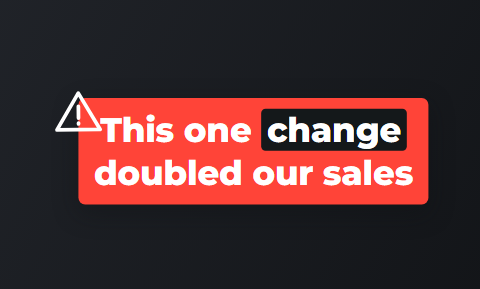 Alert
Alert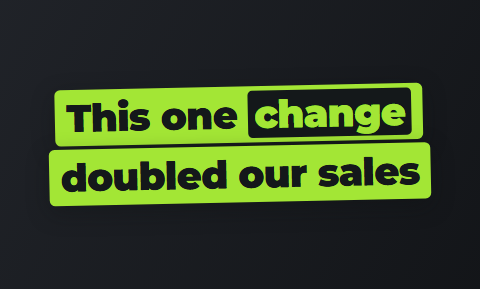 Slab
Slab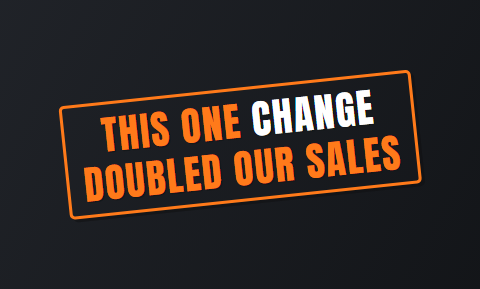 Stamp
Stamp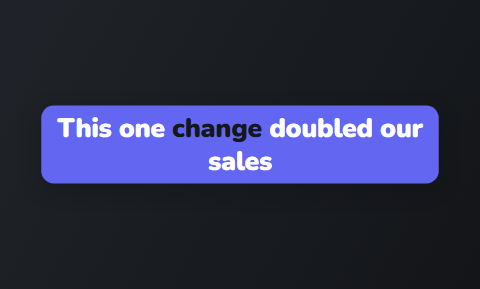 Capsule
How a solar ad is made in Cutroom
You upload the clip and an edit comes back in about a minute. No editing experience needed.
- You upload one clip of up to 3 minutes, filmed upright on a roof or in a driveway.
- Cutroom trims the pauses, places b-roll, writes a hook and adds captions in one of 40 themes.
- You correct a misheard town or utility name by fixing it in the transcript.
- You can swap the stock clips for your own footage of panels, inverters and finished roofs.
- You export a 9:16 MP4 at 1080×1920 and upload it to Meta or TikTok.
The finished ad in the player
What you export: a 1080×1920 MP4 with the hook, the b-roll and the captions burned in.

▸ 0:07 / 0:26 · shot 1 of 5
How to test several solar ad openings
Film three openings for the same ad in one session. Each one comes back as its own finished video.
Testing three openings
Film three openings
Same ad, three different first lines
Upload each one on its own
Each is edited in about a minute
Run them side by side
In Meta Ads Manager
Keep the winner
The opening that holds viewers longest
Video tools solar companies compare
The two tools solar marketers often find make video without anyone on camera.
- OpusClip is a clip finder for long video. Its Agent Opus builds solar ads from a prompt, a script or a blog URL, with AI stock visuals and a synthetic or cloned voice.
- Creatify makes ads from a web address, with AI actors and a computer voice. It is quick when you want many versions.
- Choose a generator if nobody at your company will go on camera.
- Choose Cutroom if an installer or owner will talk for a minute, because a wary homeowner is looking for a real person on a real roof.
Three tools solar marketers compare, side by side
Prices as published on each vendor's own pricing page on the date shown. Plans change; check the page before you pay.
| Tool | Best for | Editing approach | Platform | Pricing from |
|---|---|---|---|---|
 OpusClip OpusClip | Turning long videos into many short clips | AI picks clips from long video and captions them | Web, mobile | Free plan (watermark); Starter $15/month |
 Creatify Creatify | Product ads from a URL with an AI actor | URL or product page to avatar ad; script written and read by an AI actor | Web | Free plan (10 credits/month, watermark); Starter $39/month |
| Cutroom | One installer's clip finished as a 9:16 ad | Upload one clip; b-roll, captions and a hook are placed for you | Browser | First video free, no card; Lite $19.99/month |
- OpusClip
- Best for
- Turning long videos into many short clips
- Approach
- AI picks clips from long video and captions them
- Platform
- Web, mobile
- Pricing from
- Free plan (watermark); Starter $15/month
- Creatify
- Best for
- Product ads from a URL with an AI actor
- Approach
- URL or product page to avatar ad; script written and read by an AI actor
- Platform
- Web
- Pricing from
- Free plan (10 credits/month, watermark); Starter $39/month
Cutroom
- Best for
- One installer's clip finished as a 9:16 ad
- Approach
- Upload one clip; b-roll, captions and a hook are placed for you
- Platform
- Browser
- Pricing from
- First video free, no card; Lite $19.99/month
Prices and plans read from each vendor's own pricing page on 21 September 2026.
What solar video ads cost
A 30-second solar ad uses about 110 credits: 100 for the edit and 20 per finished minute at export.
- Teams that test several new ads a week usually need Basic.
- You are not charged per version, only for the credits each video uses.
- Ad spend is separate, because you pay Meta or TikTok directly.
Cutroom plans
| Plan | Price | Credits | What you get |
|---|---|---|---|
| First video | Free, no card | 600 | 7 days to make it; a Cutroom mark across the middle |
| Lite | $19.99 a month | 1,250 | About 10 one-minute videos; no Cutroom mark |
| Basic | $39.99 a month | 2,500 | About 20 one-minute videos; adds avatars and generated music |
| Premium | $79.99 a month | 5,000 | Adds animation and product shots |
Plan: First video
- Price
- Free, no card
- Credits
- 600
- What you get
- 7 days to make it; a Cutroom mark across the middle
Plan: Lite
- Price
- $19.99 a month
- Credits
- 1,250
- What you get
- About 10 one-minute videos; no Cutroom mark
Plan: Basic
- Price
- $39.99 a month
- Credits
- 2,500
- What you get
- About 20 one-minute videos; adds avatars and generated music
Plan: Premium
- Price
- $79.99 a month
- Credits
- 5,000
- What you get
- Adds animation and product shots
Questions people ask
- Should a solar video ad show savings numbers?
- No, not as a promise. Savings depend on the roof, the utility, the rate plan and the state, so one figure is wrong for most viewers and can draw complaints. Explain what drives the bill and ask the viewer to book a check of their own bill.
- Can solar ads in 2026 still mention the federal tax credit?
- Not for homeowners buying a new system. The IRS says the Residential Clean Energy Credit is not available for property placed in service after December 31, 2025. If an older ad still mentions it, re-record that line. For state or utility incentives, name the official page instead of a percentage.
- Who should be on camera in a solar ad?
- The installer or the owner. Homeowners are deciding whether to trust a company with their roof, and a crew lead who explains the job plainly answers that better than a hired presenter. Nerves are fine, because Cutroom trims the pauses and the restarts.
- How many solar ad creatives should we test at once?
- Enough that each ad set has a fresh option ready when the current winner tires. For most teams that means several new videos a month. Film three openings in one session and upload each one on its own.
- Can we film a solar ad on a roof in the wind?
- Yes, but protect the sound first. Wind makes a roof recording hard to hear, and the captions come from what the transcript hears. Use a clip-on microphone with a windscreen, or talk somewhere sheltered and use your roof clips as b-roll.
- Does Cutroom make square or horizontal solar ads?
- No. Cutroom exports 9:16 only, as a 1080×1920 MP4 for Reels, Stories, TikTok, Shorts and the vertical placements in Meta ads. For a square or horizontal version, use a timeline editor such as VEED or Canva.
Film your installer explaining one bill this week and see the finished ad in about a minute. Your first video is free.