Guide
Best AI tools for UGC creators: ChatGPT, BigVU, CapCut and 3 more
UGC creators need AI help with more than editing: the script, the recording, the captions and the portfolio too. These six tools each cover one of those jobs.
In short
- The best AI tools for UGC creators are ChatGPT, BigVU, CapCut, Submagic, Canva and Cutroom, one for each job.
- ChatGPT drafts and rewrites your script from the brand's brief.
- BigVU is a teleprompter app, so you can read the script while you record.
- CapCut, Submagic and Cutroom edit the video. Cutroom does the whole edit of a clip of you talking.
- Canva is best for your portfolio, rate card and thumbnails.
- tools compared
- 6
- to start with five of the six
- $0
- the longest clip Cutroom accepts
- 3 min
The best AI tools for UGC creators at a glance
Here is what each tool is best at, what it costs and what it leaves to you.
Six AI tools for UGC creators
Prices from each company's own pricing page on the date shown. Plans change, so check before you pay.
| Tool | Best for | Editing approach | Platform | Pricing from |
|---|---|---|---|---|
| ChatGPT | Writing and rewriting UGC scripts from a brief | You paste the brief, read the draft and ask for changes | Web, iOS, Android, desktop app | Free plan; Plus $20/month in the US |
 BigVU BigVU | Recording a script from a teleprompter | You read from a teleprompter while you record, then edit on your phone | iOS, Android, web tools | Free plan with watermark; Starter $12/month or $149/year |
 CapCut CapCut | Free editing of videos made of many clips | A timeline editor with templates and AI tools | iOS, Android, Windows, Mac, web | Free; Pro $19.99/month or $179.99/year (varies by region) |
 Submagic Submagic | Captions on videos you have already edited | It adds captions, b-roll and sound effects to short videos | Web | No free plan, free to try; Starter $12/month billed yearly ($19 monthly) |
 Canva Canva | Portfolio, rate card, thumbnails and simple videos | A drag-and-drop design canvas with a video timeline | Browser, iOS, Android, Windows, Mac | Free plan; Pro US$144/year for one person |
| Cutroom | Turning one clip of you talking into a finished vertical ad | It edits your clip for you: cuts, captions, b-roll and a hook | Web | First video free, no card; Lite $19.99/month |
ChatGPT
- Best for
- Writing and rewriting UGC scripts from a brief
- Approach
- You paste the brief, read the draft and ask for changes
- Platform
- Web, iOS, Android, desktop app
- Pricing from
- Free plan; Plus $20/month in the US
- BigVU
- Best for
- Recording a script from a teleprompter
- Approach
- You read from a teleprompter while you record, then edit on your phone
- Platform
- iOS, Android, web tools
- Pricing from
- Free plan with watermark; Starter $12/month or $149/year
- CapCut
- Best for
- Free editing of videos made of many clips
- Approach
- A timeline editor with templates and AI tools
- Platform
- iOS, Android, Windows, Mac, web
- Pricing from
- Free; Pro $19.99/month or $179.99/year (varies by region)
- Submagic
- Best for
- Captions on videos you have already edited
- Approach
- It adds captions, b-roll and sound effects to short videos
- Platform
- Web
- Pricing from
- No free plan, free to try; Starter $12/month billed yearly ($19 monthly)
- Canva
- Best for
- Portfolio, rate card, thumbnails and simple videos
- Approach
- A drag-and-drop design canvas with a video timeline
- Platform
- Browser, iOS, Android, Windows, Mac
- Pricing from
- Free plan; Pro US$144/year for one person
Cutroom
- Best for
- Turning one clip of you talking into a finished vertical ad
- Approach
- It edits your clip for you: cuts, captions, b-roll and a hook
- Platform
- Web
- Pricing from
- First video free, no card; Lite $19.99/month
Prices and plans read from each vendor's own pricing page on 21 September 2026.
Which tool does which job?
A UGC creator needs help with six jobs, from writing the script to showing brands a portfolio. Each tool here is best at one of them.
Each job and the tool for it
| Job | Tool | What it does for you |
|---|---|---|
| Writing the script | ChatGPT | Drafts and rewrites the script from the brief |
| Recording the script | BigVU | Shows the script on a teleprompter while you film |
| Editing a video made of many clips | CapCut | A free timeline for unboxings and montages |
| Adding captions to an edited video | Submagic | Adds captions, b-roll and zooms |
| Editing a video of you talking | Cutroom | Returns a finished vertical ad in about a minute |
| Showing brands a portfolio and rate card | Canva | Design templates and a brand kit |
Job: Writing the script
- Tool
- ChatGPT
- What it does for you
- Drafts and rewrites the script from the brief
Job: Recording the script
- Tool
- BigVU
- What it does for you
- Shows the script on a teleprompter while you film
Job: Editing a video made of many clips
- Tool
- CapCut
- What it does for you
- A free timeline for unboxings and montages
Job: Adding captions to an edited video
- Tool
- Submagic
- What it does for you
- Adds captions, b-roll and zooms
Job: Editing a video of you talking
- Tool
- Cutroom
- What it does for you
- Returns a finished vertical ad in about a minute
Job: Showing brands a portfolio and rate card
- Tool
- Canva
- What it does for you
- Design templates and a brand kit
This is the whole editor
Highlight a phrase and a clip lands on those exact words. No timeline, no keyframes, no layers.
ChatGPT
ChatGPT turns a brand's brief into a first draft of your script. You paste the brief, the product page and the tone you want, then ask for changes.
- Best for: writing and rewriting UGC scripts from a brief.
- Ask for three hooks, or a version half as long, and it rewrites the draft for you.
- Plus adds projects and custom GPTs, so you can save a brand's brief and reuse it.
- Price: the free plan has unlimited text chats. Plus is $20 a month in the US. ChatGPT also has a cheaper plan, Go, and a Pro plan, priced in your local currency.
- Tradeoff: it only writes the script and does not make the video. A short brief gives a generic draft.
BigVU
BigVU is a teleprompter app with an editor built in. The script scrolls while your phone records, so you do not lose your lines.
- Best for: creators who read a brand's script on camera.
- Its AI can write the script, and Starter adds unlimited captions.
- AI Pro adds eye contact correction, background replacement, auto b-roll and split screens.
- Price: the free plan exports at 720p with a watermark, with a 9-minute limit per recording and 500 AI credits a month. Starter is $12 a month or $149 a year, and AI Pro is $19 a month or $229 a year.
- Tradeoff: you apply the editing tools one by one on your phone.
CapCut
CapCut is an excellent free editor, and videos made of many clips, like unboxings, are easiest to edit in it. It runs on your phone, your computer and in the browser.
- Best for: unboxings, hauls and montages where each video needs its own look.
- It has a big library of templates, effects, filters and stickers, and exports up to 8K.
- Pro adds auto captions, background removal and noise reduction.
- Price: free. Pro is $19.99 a month or $179.99 a year, and the price is set in the app and varies by region.
- Tradeoff: you make every edit yourself, so each video takes time.
Submagic
Submagic is a strong caption tool for short videos. You upload a video you have already edited, and it adds captions, b-roll and sound effects.
- Best for: creators who edit their own videos and want animated captions added for them.
- Its captions work in 123 languages. Magic Clips cuts long videos into short ones.
- Pro adds automatic zoom-ins and b-roll from the Storyblocks stock library.
- Price: there is no free plan, but you can try it free. Starter is $12 a month billed yearly, or $19 monthly, for 15 videos a month up to 2 minutes. Pro is $23 billed yearly, or $39 monthly, for 40 videos up to 5 minutes.
- Tradeoff: videos are capped per plan, and you still edit the video somewhere else first.
Canva
Canva is a very good design tool, and it covers the work around your videos. It suits your portfolio page, your rate card and your thumbnails.
- Best for: a portfolio and a rate card that a brand will open on a phone.
- The brand kit keeps your colours and fonts on every design.
- Its video timeline adds captions in one click, and Magic Video and Highlights make a first draft.
- Price: there is a free plan. Canva Pro is US$144 a year for one person.
- Tradeoff: for an ad where you talk, you still time every cut yourself.
Prices and free plans
Five of the six are free to start. Submagic has a free trial instead of a free plan.
Free plan and cheapest paid plan
From each company's own pricing page. Yearly means billed once a year.
| Tool | Free plan | Cheapest paid plan | Good to know |
|---|---|---|---|
| ChatGPT | Yes: unlimited text chats | Plus: $20 a month in the US. A cheaper Go plan is priced in your local currency. | Plus adds projects and custom GPTs |
| BigVU | Yes: 720p, watermark, 9 minutes per recording | Starter: $12 a month or $149 a year | Most AI tools need AI Pro, $19 a month |
| CapCut | Yes: whole editor, 8K export | Pro: $19.99 a month or $179.99 a year | Auto captions are on Pro; price varies by region |
| Submagic | No: free trial | Starter: $12 a month yearly ($19 monthly) | 15 videos a month, 2 minutes each |
| Canva | Yes | Pro: US$144 a year, one person | Priced per person |
| Cutroom | Your first video, no card, within 7 days, with a Cutroom mark | Lite: $19.99 a month, 1,250 credits | Clips up to 3 minutes, vertical video only |
Tool: ChatGPT
- Free plan
- Yes: unlimited text chats
- Cheapest paid plan
- Plus: $20 a month in the US. A cheaper Go plan is priced in your local currency.
- Good to know
- Plus adds projects and custom GPTs
Tool: BigVU
- Free plan
- Yes: 720p, watermark, 9 minutes per recording
- Cheapest paid plan
- Starter: $12 a month or $149 a year
- Good to know
- Most AI tools need AI Pro, $19 a month
Tool: CapCut
- Free plan
- Yes: whole editor, 8K export
- Cheapest paid plan
- Pro: $19.99 a month or $179.99 a year
- Good to know
- Auto captions are on Pro; price varies by region
Tool: Submagic
- Free plan
- No: free trial
- Cheapest paid plan
- Starter: $12 a month yearly ($19 monthly)
- Good to know
- 15 videos a month, 2 minutes each
Tool: Canva
- Free plan
- Yes
- Cheapest paid plan
- Pro: US$144 a year, one person
- Good to know
- Priced per person
Tool: Cutroom
- Free plan
- Your first video, no card, within 7 days, with a Cutroom mark
- Cheapest paid plan
- Lite: $19.99 a month, 1,250 credits
- Good to know
- Clips up to 3 minutes, vertical video only
Which AI tool should a UGC creator choose?
Each tool is the best choice for one part of the job.
Which AI tool should a UGC creator choose
Choose ChatGPT if you have a brand's brief and want hook and script options before you film.
Choose BigVU if you read a brand's script on camera and want a teleprompter, captions and eye contact correction on your phone.
Choose CapCut if the brief is an unboxing or a montage and you want a free timeline to edit it yourself.
Choose Submagic if your videos are already edited and you want captions, zooms and b-roll added for you.
Choose Canva if you need a portfolio, a rate card and thumbnails that look like one brand.
Choose Cutroom if you film one clip of yourself talking, up to 3 minutes, and want it back as a finished vertical ad you can send to the brand. Your first video is free.
Where Cutroom fits
Cutroom is for paid UGC where you talk to the camera. You upload one clip and get a finished vertical ad back in about a minute, ready to send.
- You upload one clip of yourself talking, up to 3 minutes long.
- Cutroom cuts the pauses, puts b-roll clips over the things you mention, adds a hook and adds captions in one of 40 styles.
- You change the video in the transcript. Delete a line to cut it, or write a new opening headline. Pick a faster or calmer pace and Cutroom re-cuts the whole video.
- It fits a testimonial, a problem-and-solution video or a list of reasons. An unboxing made of many clips is easier in CapCut.
- A 30-second video costs about 110 credits, so Lite's 1,250 credits cover about 11 of them. Basic, at $39.99 for 2,500 credits, adds avatars and music.
- Your first video is free, with no card, and you have 7 days to make it. It carries a Cutroom mark; Lite at $19.99 a month removes it.
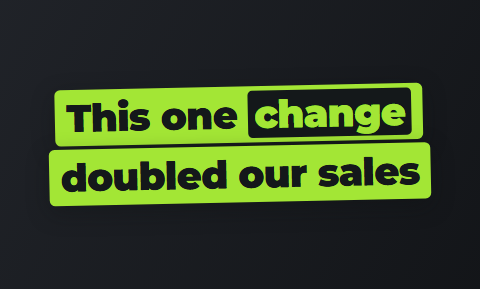
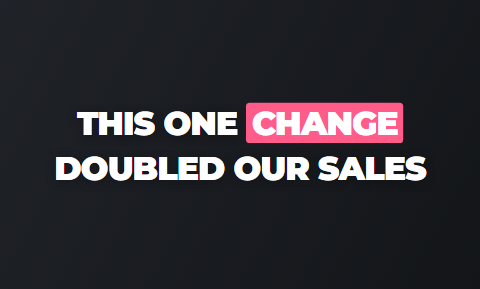
The hook at the start of your video
Pick one of the headlines Cutroom drafted, or write your own.
 Slab
Slab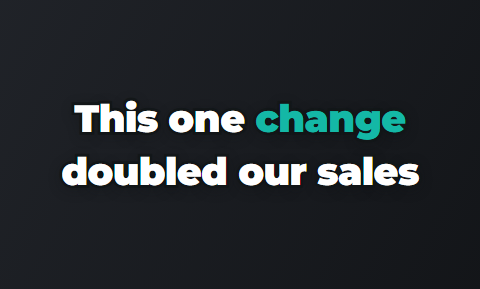 Outline
 Punch
Punch Sweep
Sweep Spotlight
 Alert
Alert Capsule
 Title
Title
Questions people ask
- What are the best AI tools for UGC creators?
- The best AI tools for UGC creators are ChatGPT for the script, BigVU for recording from a teleprompter, CapCut for editing many clips, Submagic for captions on videos you have already edited and Canva for the portfolio. Cutroom is best when you film one clip of yourself talking and want it back as a finished vertical ad.
- Which AI tools can a UGC creator start using for free?
- Five of the six. ChatGPT has a free plan with unlimited text chats. BigVU's free plan exports at 720p with a watermark. CapCut and Canva have free plans. Cutroom's first video is free, with a Cutroom mark. Submagic has a free trial, and Starter is $12 a month billed yearly.
- Can ChatGPT write a UGC script a brand will accept?
- Yes, as a first draft. Paste the brief, the product page and two lines about how you talk, then ask for several hooks and a 30-second version. The more detail the brief has, the less generic the script.
- Do UGC creators need a teleprompter app?
- Not always. A short testimonial in your own words is easy to say without one. When a brand sends a script you must read word for word, a teleprompter app like BigVU shows the lines while you film, so you need fewer retakes.
- How do I deliver several hook versions from one video?
- Film the main part once and change the opening. In CapCut you copy the project and edit the first seconds by hand. In Cutroom you write a new opening headline, or pick one it drafted, and the hook changes on the same video.
- What does Cutroom cost for a UGC creator?
- About 110 credits for a 30-second video: 100 to transcribe it, edit it and find the b-roll, plus 20 per minute of export. Lite is $19.99 a month for 1,250 credits, which covers about 11 of them. Basic is $39.99 for 2,500 credits plus avatars and music, and Premium $79.99 for 5,000.
- When should I write the script or edit the video myself?
- Write the script yourself when the brand hired you for your own voice, since AI drafts tend to sound alike. Edit by hand when the brief is a montage, a video cut to a trending sound or a shot list the brand planned second by second. CapCut gives you that timeline for free.
Upload the clip from your next brief and send the brand a finished vertical ad the same day. Your first video is free.